How to integrate PayrollKit
Use PayrollKit's API and embedded payroll workflow to onboard an employer and run their payroll. Your product sends the information it already holds, and the PayrollKit component collects or confirms the payroll details the employer needs to complete.
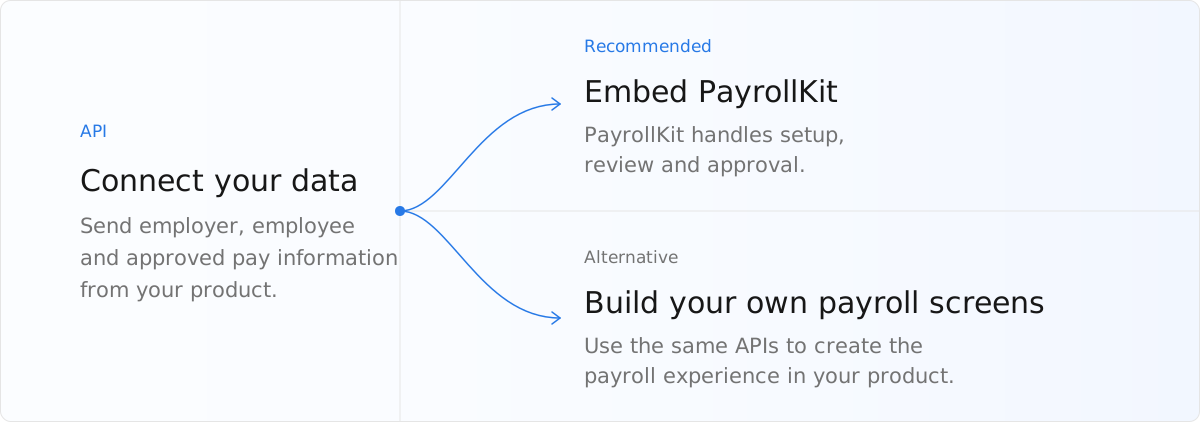
Recommended integration
Get access to PayrollKit
Email partners@payrollkit.io to request access. Include your company name, product name and technical contact. We'll confirm the next steps and provide your OAuth client credentials. Follow Authentication and permissions to request a server-side access token.
Onboard an employer
- Create the employer through the API using the employer and employee information your product already holds.
- Open the PayrollKit component for Employer setup so the employer can confirm that information and complete their payroll setup.
Follow the onboard an employer guide for the complete walkthrough.
Run payroll each period
- Send approved pay information from your product to PayrollKit through the API.
- Open the PayrollKit component at the Pay Run so the employer can review the calculation and approve payroll. When the approved Pay Run has reportable results, PayrollKit creates and submits the FPS to HMRC automatically.
Follow the run payroll each period guide for the complete walkthrough.
Keep your data in sync
Send changes through the API, and use signed webhooks to retrieve changes made in PayrollKit.
Follow the keep data in sync guide for the complete walkthrough.
Alternative: Build your own payroll screens
You can replace the PayrollKit component with screens you build using the API. Your product then collects missing payroll details, shows issues and supports employer review and approval. PayrollKit calculates payroll and, after approval, automatically creates and submits an FPS when the Pay Run has reportable results. It also creates Payslips and requested files.

